
View users
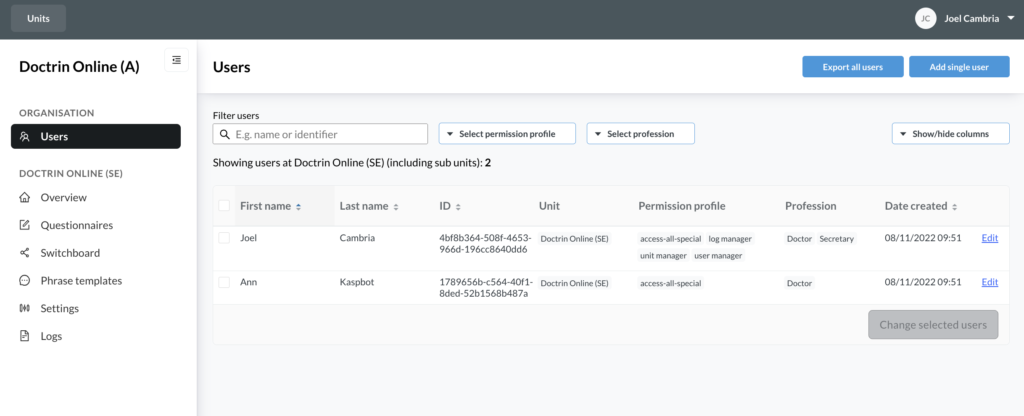
As a User Manager you have access to one or more units in Doctrin Admin.
If you open a unit in Admin and select “Users” from the menu, a list of all users added to this unit you have opened will be displayed.
Group root, customer root and organisational level
If you open the “Users” tab on a “group root”, i.e. on a unit that has one or more units under it, the list will show all users on the “group root” and the respective underlying unit.
If you have permission to access the “customer root”, i.e. the highest level of the organisation hierarchy in Doctrin Admin, you can see all users within the organisation – even those who do not have a workplace assigned to them.
At this level you can see a number showing the total amount of users. The number updates according to the filters applied to the list (including sub-units). For example, it is possible to see how many nurses that are working in a unit.
See also the sections create a user and add users, remove permissions and delete users.
Columns in the list of users
| First name, last name, identifier | Phone number | Workplaces | Export access log |
|---|---|---|---|
| – | Shows status of the user’s phone number. Ok = phone number is entered in a correct format. The user can receive notifications. Incorrect = entered phone number is in the wrong format. It needs to be updated in order for the user to receive notifications. Missing = there is no phone number entered. The workplaces to which the user is connected. Shows only the devices you have access to as an administrator. Shown only to users with permissions ‘Authorised to access user access logs’. Learn more about permissions. | View users’ ongoing cases In admin, you can see if a user has ongoing cases. Select a user and choose “Show ongoing cases”. If the user is active, a list of all cases in which the user is currently involved will be shown, including cases that are to be closed and require confirmation from a patient. The table shows case ID, case status, the user’s role, the unit to which the case belongs and a link to the case documentation. Use the ability to see if a user has ongoing cases in case you need to remove a user’s access to a unit. More about access to units for users |
Updated on 2026-05-28