
Import CSV file for a bulk sendout
Import recipients using a CSV file when you want to send the same information to a larger number of people. The platform helps you complete missing information.
File requirements and technical limitations
The platform creates recipients based on an identifier (such as NHS number or memberID, depending on a unit’s configuration). If an imported identifier already is linked to a patient in the platform, they will be added to the recipient list with their information.
Files imported into the platform must:
*be a CSV file. E.g. “my-file.csv”.
*contain only one column consisting of identifiers.
*have a header line. The text in the header can be anything, e.g. “identifiers”.
*have a maximum of 1 identifier per line.
*have a maximum of 1000 rows, excluding the header.
Example of what a CSV file should look like:
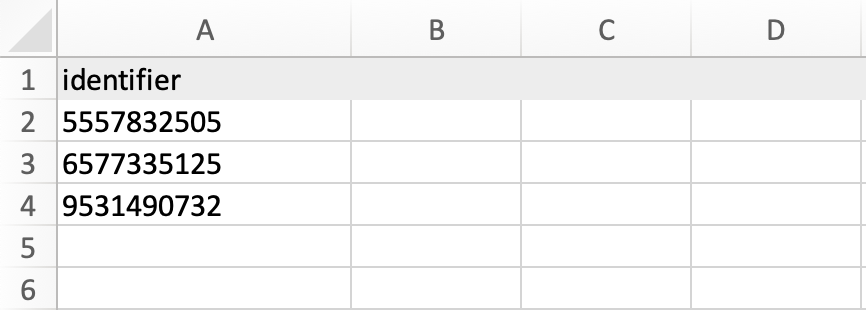
Note! If you create a CSV file manually, make sure there are no duplicate entries. If you convert a file from another format to CSV, always check that the content has been transferred correctly and appears as expected.
What happens when a CSV file is imported
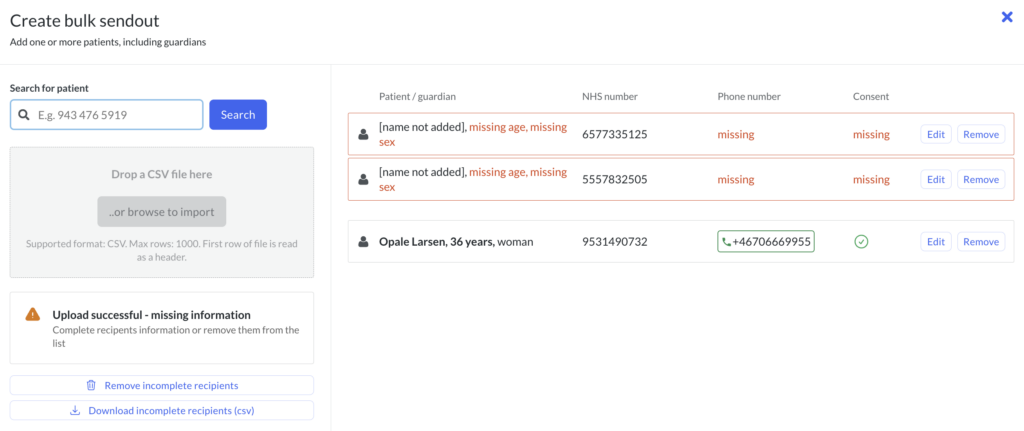
When you import a file with identifiers, the platform checks whether they are already registered or not. If the identifiers are linked to people registered in the platform, you will see this in the recipient list that is created.
Handling incomplete recipients
If you import identifiers that are not registered in the platform, you will get information on what you need to complete in order to continue.
It is also possible to delete all incomplete recipients or download a file with the incomplete ones to handle them in another way. E.g. call them.
When all recipients in the list have all the information needed to create a bulk sendout, you can continue to create the content.
Troubleshooting during failed upload
If the platform detects an error with an imported file, you will be informed about it. It can be an error with the file itself or an error in the content of the file. Here are a few things to look for:
*The file has the extension .csv but is not a csv. It has probably been incorrectly converted.
*the file contains more columns than one.
*the file contains characters that are not numbers.
*the file contains too many rows.
*The file does not have a header row.
*the file has rows with duplicates. For example, the same identifier appears several times.
Updated on 2025-07-10