
Delete patient and their data
Under the General Data Protection Regulation, all individuals have the right to have their personal data erased upon request. This is known as the “right to be forgotten”.
If you have the permission profile “Sensitive data admin“, you can search for a patient in admin and delete their data permanently. This function enables all units to independently comply with the requirements of the General Data Protection Regulation.
Note! It is the clinicians responsibility to ensure that the patient’s treatment is completed and that the necessary documentation for the patient is done before the patient’s data is deleted.
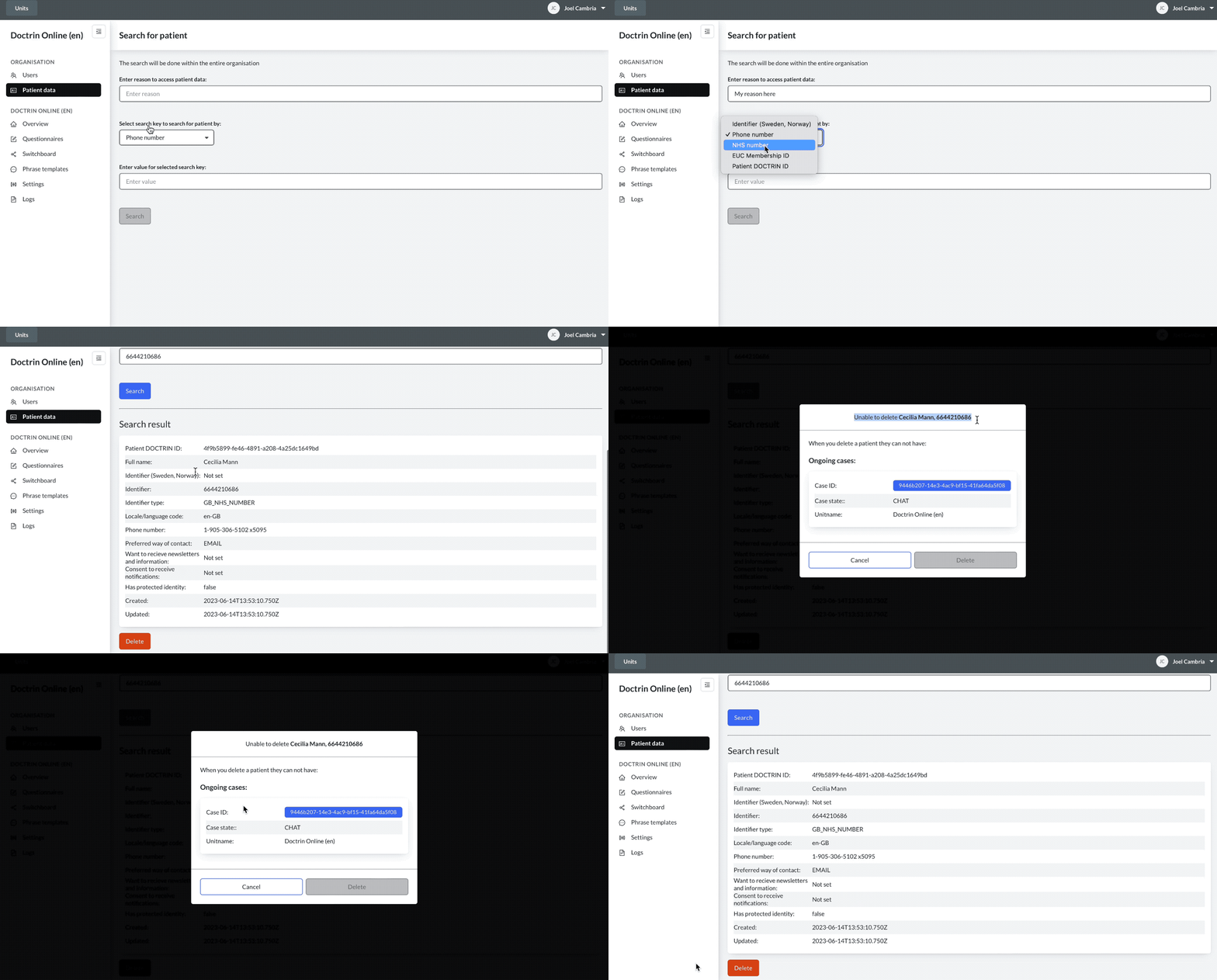
How to delete a patient and their data
- Log in to Admin.
- Select the organisation you want to manage.
- Select “Delete patient data” in the menu.
- Use the search field to find the patient that requested their data to be deleted.
- Select the patient you want to delete in the search result.
- Select “Confirm” to carry out the deletion of personal data.
- The patient is now removed from the platform. A confirmation message appears on the page.
Information about patient risk
• A patient with ongoing cases or unmanaged Sendouts can not be deleted.
• If a patient has a scheduled sendout, a clinician can still choose to delete a patient’s data. The platform informs the clinician to check the content of the sendout before any deletion. If the clinician chooses to delete the patient’s data, a scheduled sendout is also deleted.
Updated on 2023-07-26