
Manage questionnaires
There are many similar questionnaires, we recommend discussing with Doctrin before toggling on/off questionnaires in Admin.
Manage which questionnaires that should be available to patients and healthcare professionals.
How to activate a questionnaire
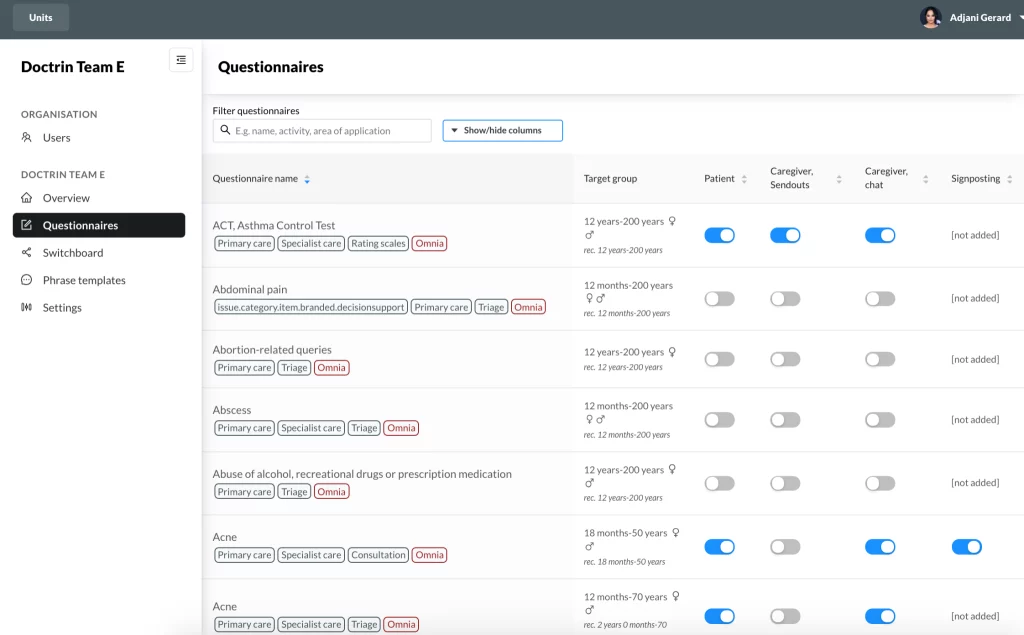
- Login in to Admin and select the unit you want to manage.
- Select Questionnaires in the menu. The list shows all available questionnaires.
- Toggle on/off questionnaires by using the toggle buttons for each area.
- Toggle on Patient – the patient can see the questionnaire while seeking care (during onboarding).
- Toggle on Caregiver, Sendouts – healthcare professionals can include this questionnaire in a Sendout to a patient.
- Toggle on Caregiver, chat – healthcare professionals can send this questionnaire to the patient in an active case, chat communication.
- Toggle on Signposting – to activate signposting for this questionnaire.
This means that you can add an information text that will be shown to patients after selecting (but before answering) the questionnaire during onboarding, while seeking care. - Toggle on Sub-units – to make this questionnaire available for administrators in a sub-unit of your current unit.
Additional settings for a questionnaire
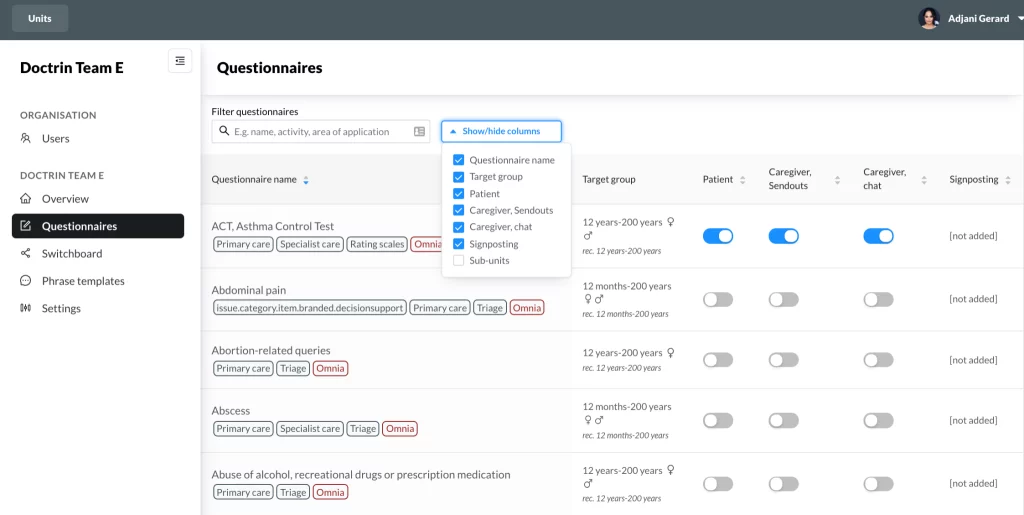
If you can not see all options, columns might be hidden from the view. Select “Show/hide columns” and mark the columns that you want to be visible.
The lists can be sorted based on one of the list headers. Click on one to change sort order.
Use the search field to search for questionnaires that have a specific use:
- Intended use, e.g. patient, chat or sendout.
- Type of questionnaire, t.ex. health check-up, symptom, self assessment scale, appointment, video.
Good to know
Note that if the unit that you are managing has sub-units, they will by default inherit the changes that you make here.
This means that if you toggle on a questionnaire for your unit, it will be toggled on for all the sub-units. This applies to any changes made for Questionnaires in Admin.
Sub-units can override the inheritance at any time.
It is possible to change age limits for a questionnaire. The default age limit is set by Doctrin based on the ages for which the form was created and tested. Please contact Doctrin Support if you would like to extend the age limits for a questionnaire.
Updated on 2025-11-27