
Handover a case to a colleague
Handover can be used as part of initial triage or to balance the workload. You can handover a case to an entire professional group(s), or a specific colleague.
If you are e.g. at the end of your work shift, handover a case to a colleague to ensure the care for a patient. When you request a handover, you will still see the case in the list “My ongoing cases“. This illustrates that you still are responsible for the case, until a new owner has taken over the case.
You can choose if you want to stay on as a consulting caregiver in the case, or leave it when a colleague takes over the ownership. If you choose to stay in the case, it will be moved to the “My consultations” list.
A case pending handover is locked, but you can view the information.
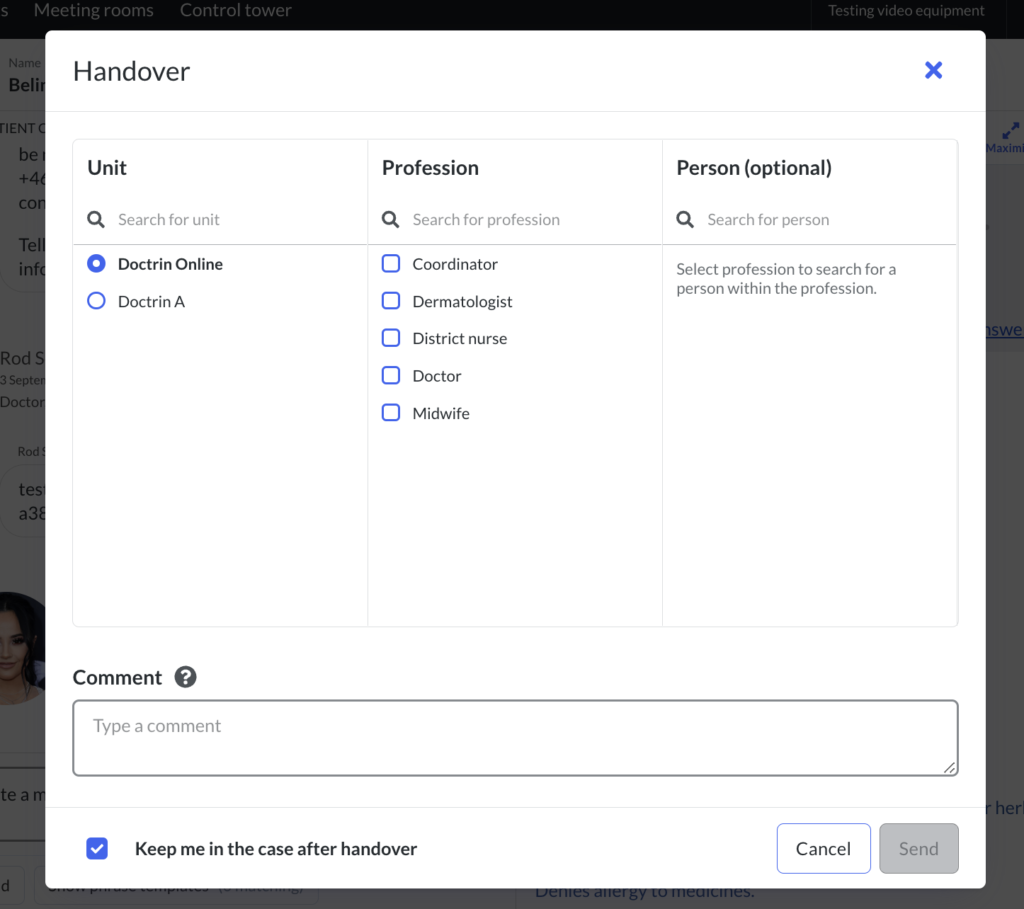
How to handover a case to a colleague
- Go to the case view for a patient.
- Select “Handover” in the tool panel.
- In the pop-up that appears, choose to send the Handover to a whole profession(s) or a specific colleague:
- Select only a profession, if you want help from anyone in the group.
- Select also the name of a specific colleague, if you want help from a specific colleague.
- Leave “Keep me in the case after handover” checked if you want to stay in the case. If you uncheck it, you will automatically be removed from the case once it has been handed over.
- Add a comment if needed (optional).
- Select “Send handover”.
If a comment is added it will be shown to whoever opens the request. The comment can be used to explain why a handover is needed.
Only the selected profession(s) or selected colleague will be able to take over the case. You can only hand over to a profession(s) that have at least one user.
The case will appear in the list “Cases needing new owner”, but only for the users with the profession(s) you picked, or the specified colleague (by name) that you selected.
Decline a handover
A handover can be declined, if this happens the handover is cancelled. Whoever declines a handover can write a comment why. The comment will appear in the chat.
Additional information
It is not possible to handover a case if there is pending invitations. Wait for the invited colleague to accept the invitation or cancel the invitation before doing a handover.
Updated on 2023-01-20