
Out of office – inform colleagues when you are away
Make collaboration in your unit easier by informing colleagues when you are away. For example, during holidays, training or public holidays.
Mark yourself as Out of office in the platform so colleagues can see when you are available or not. Colleagues can see the status when doing a handover, invitation, for colleagues already participating in a case and between units using Doctrin Network.
Add an optional message with extra information to your colleagues. E.g. a date or time when you will be avaliable again or other information that your colleagues should know about you.
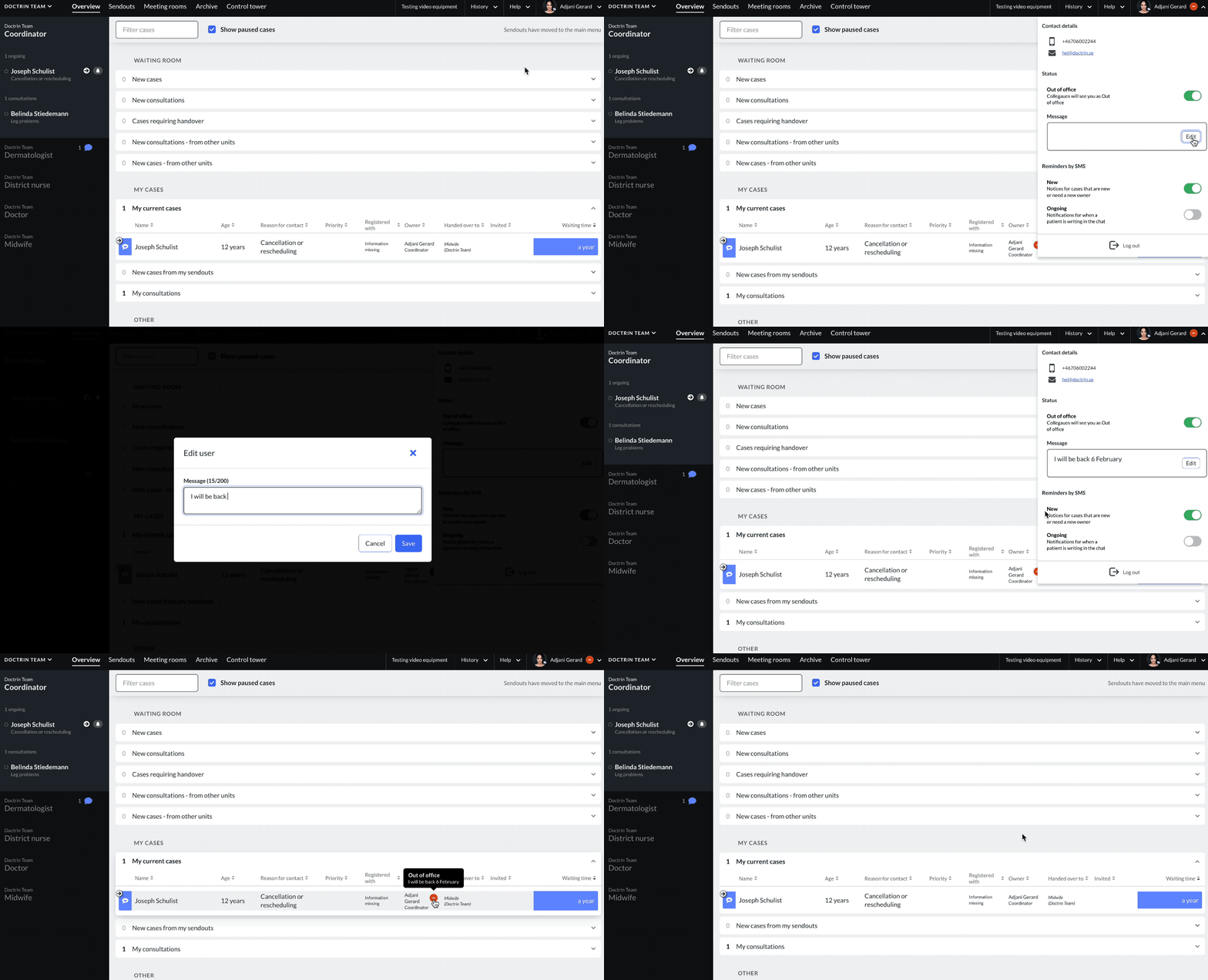
How it works
- Go to the main menu
- Choose to expand the tab under your name
- Choose to turn on “Out of office” to activate the status
- Add an optional message, e.g. a date when you will be available again
When you are back at work, choose to turn off “Out of office” to disable the status.
Where colleagues see the status
- When inviting colleagues to a case
- In a case, where a colleague marked as “Out of office” participates
The status is also shown between units using Doctrin Network, when an external handover or invitation is created.
Updated on 2023-01-31