
Join meeting room as a patient
Patients participate in the activity held in a virtual meeting room. This means that they join a video consultation with a join code.
Everything a participant needs is a secure login for authentication, a join code and a short instruction.
How it works for a patient:
- The patient logs into the platform with a secure login for authentication
- The patient selects “Join a video consultation” in the main menu.
- The patient is asked to enter a 9 digit join code. The patient has received the join code from their caregiver in e.g. an appointment letter.
- The patient selects “Continue”.
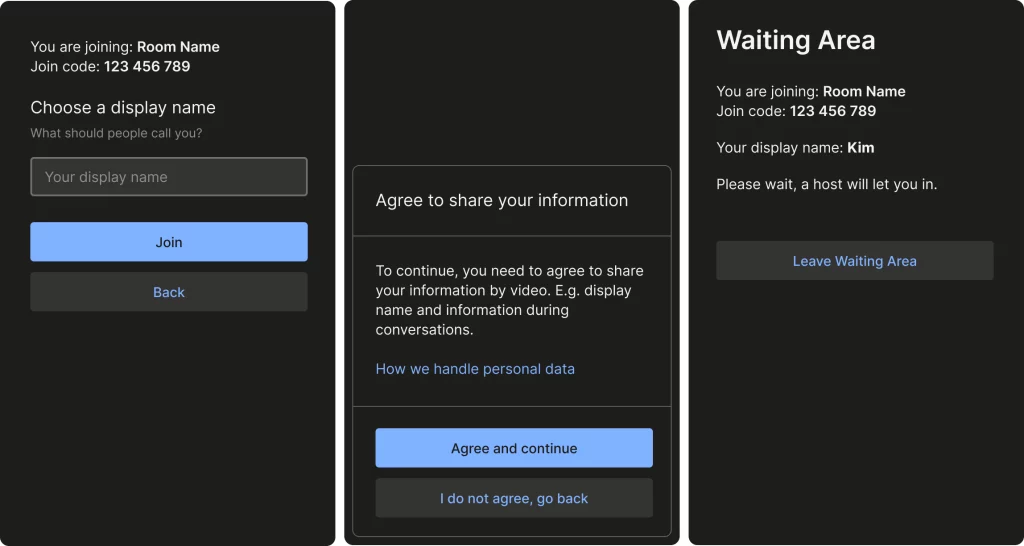
- The patient is asked to enter what they want to be called during the video consultation, by entering a so-called “display name“. The patient can freely choose a name, which also means that patients with protected identities can participate on equal terms. The display name will be visible to all participants and will help them to address each other in e.g. group discussions.
- The patient selects “Join”.
- The patient is asked to agree to share personal information in the meeting room. A link to the unit’s privacy notice provides more information on how personal information is handled.
- The patient will enter the Waiting Area* for the video consultation held in the meeting room.
- The patient is waiting in the Waiting Area* until the caregiver is ready to admit participants to the video consultation.
* in the Waiting Area patients can see the name for the video consultation e.g. “Parent group A”, the join code and their chosen display name. Patients can also choose to leave the Waiting Area.
How display name and Waiting Area looks for a patient
During a video consultation in a virtual meeting room, the patient can:
- Switch camera. If the patient has a device with multiple cameras, such as a smartphone, they can switch between the front and back camera.
- Turn on/off their own microphone.
- Leave the video consultation. Other participants still be in the video consultation.
- Not turn off their camera.
To ensure that all participants are securely logged in, patients need to authenticate themselves before entering a video consultation in a virtual meeting room.
Patients’ selected display names are shown instead of a real name, to protect patients’ privacy and data. All participants (patients and caregivers) can see a display name. Caregivers are always shown with their real name and professional role for all participants.
Updated on 2024-04-29