
Deep links with preselected reason for contact
Deep links with pre-selected reason for contact allow you as a caregiver to shorten the path for a patient. You also ensure that the patient selects the correct questionnaire for the reason for contact. For example, the links can be used on a website or in a custom app.
Deep links can be used both for questionnaires started by a patient and sent by a clinician.
How deep linking works
With deep linking it is possible to allow a patient to start a case with a preselected reason for contact – directly from a link, without having to search and click to the desired reason for contact. After authentication, the patient is immediately directed to a new case and can start their contact with you. This means that they will not see the home page where ongoing cases are displayed.
Example:
For example, if “Prescription renewal” is used frequently on your unit, it’s possible to create a direct link to the reason for contact and use it on a web page or in an app so that a patient has a shorter path to you.
It is possible to create a direct link to the search term “Book an appointment for vaccination” during flu periods, to use e.g. in different types of marketing.
There is a built-in check to ensure that the patient meets the gender or age requirements linked to the questionnaire. If the patient does not meet the requirements, they are redirected to the common flow where they can seek care by selecting a different reason for contact.
How to do
The structure of a link depends on how the platform is integrated into your flow. The parameters of a link are organisation, unit and medical ID (reference to reason for contact).
The Medical ID (MedID) is available in Doctrin Admin and by Doctrin Enterprise API v2. The Medical ID has the format “f_xxx“.
In Doctrin Admin, MedID is located under the Questionnaires tab in the menu of the unit you are managing. Select the questionnaire you want to link to. In the panel you find the ID under the heading Medical ID.
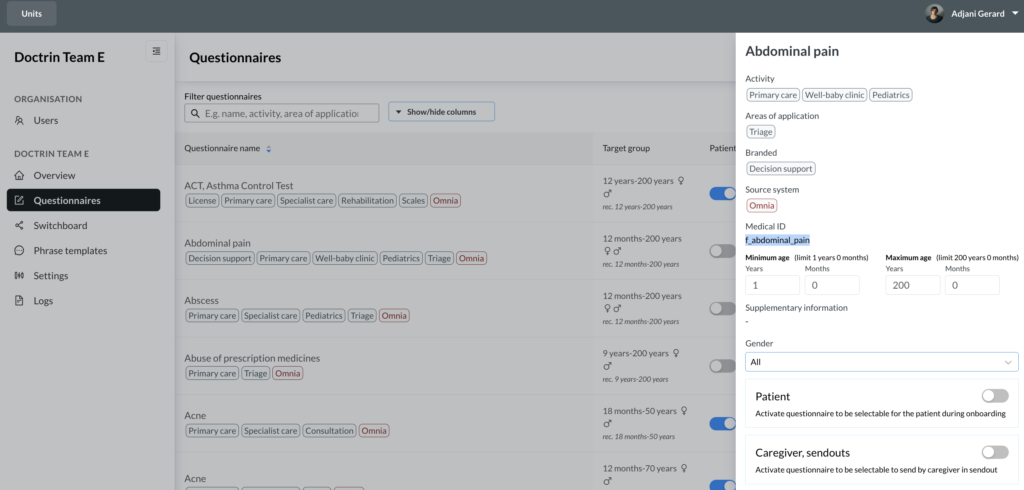
Structure of links
To share a link on your website or native app, the link have this structure:
GET /{mainOrg}/{subOrg}/preselected-issue/{medId}
GET represents the domain that is customised by customer and country. The parameters mainOrg and subOrg represent the customer root and unit, i.e. the URI of a unit.
Example
Swedish customers use e.g. the URL https://e-besok.se. A complete URL will then be:
https://e-besok.se/{mainOrg}/{subOrg}/preselected-issue/{medId}
Example link: https://e-besok.se/doctrin/health-center/preselected-issue/f_prescription_renewal
mainOrg: Doctrin
subOrg: Health Center
medID: f_prescription_renewal (prescription renewal)
If you do not have access to the API or if Single Sign On is integrated in your flow, contact Doctrin support or your account manager to get help with medical ID and the structure of the link.
Updated on 2024-02-09