
Lists and columns
Cases in the Overview are grouped into lists. You can open and close a list by clicking on the heading.
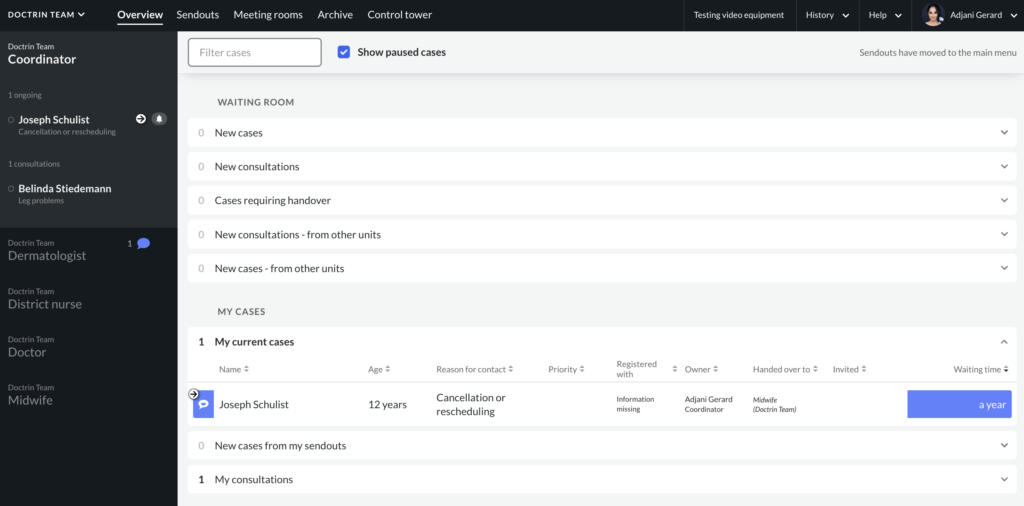
List in – Waiting room
These are new cases that you are yet not participating in, but they could be relevant for you to take ownership of.
- New cases – this list contains all cases that is available to you, and that do not yet have an owner. Cases can be either routed directly to your profession or is available to all professions. You can see in the column “Assigned to”, if the case requires your profession specifically.
- New consultations – this list contains all cases where the current owner has asked for a consultation that is available for you to answer. They can ask for your profession or for you personally. Check the column “Invited” to see which. If you are invited personally it is a good idea to either accept or decline it. If they ask for a profession and another user that is eligible accepts it will disappear from the list.
- Cases that require a new owner – this list contains all cases where new ownership is required. This can be asked for by the current owner manually or automatically in some specific situations where the current owner isn’t responding to the patient. You can see in column “Handover to” if it is for your specific profession or for you personally. If you have been asked personally it is a good idea to either accept or decline it If they ask for a profession and another user that is eligible accepts it it will disappear form the list.
If a unit has Doctrin Network activated you will see two additional list in the Waiting room.
- New consultations from another unit – this list works the same way as the “New consultations” list but shows cases from other units instead of from your own.
- New cases from another unit – this list shows handovers from other units. Note that when doing a handover from anther unit the case will be closed on that unit and you will take ownership of a new case with a history summary available from the last case. The previous owner will not be part of this case.
Lists in – My cases
These are cases that you are participating in.
- My ongoing cases – this list contains all cases where you are assigned as the owner.
- My consultations – this list contains all cases where you consult, but are not the owner.
If a unit has Sendouts activated, there is one additional list:
- New cases from Sendouts – when you have created a Sendout and the patient answers it and reaches chat the case will appear in this list.
Lists in – Other
Needs to be closed – this list contains all expired cases that you need to verify and close. This is to ensure that you get time to document each case.
Note. This list is outdated and has been removed 2024.
If a user have access to “See all cases” they will see one additional list in Other:
- All new and ongoing cases – This list shows all cases on the unit that is either new or opened. It does not show closed cases. This list can be used by a coordinator to see cases that otherwise would not be visible to their profession.
If Doctrin Network is activated, there is one additional list in Other:
- Handed over to another unit – when you handover a case to another unit the case is closed in your unit and is moved to this list.
If a user have access to “See all cases” AND Doctrin Network is activated, they will see one additional list in Other:
- All cases – from other units – This list creates an overview of all collaborations with Doctrin Network. This list shows all incoming handovers and invites as well as ongoing consultations. This list can be used by caregivers to see cases that otherwise would not be visible to their profession.
Columns in lists
Lists can have different kind of columns, depending on the features that are activated for a unit. Columns marked with (*) is visible if a unit has this feature activated.
Avaliable columns:
- Name – name of the patient
- Age – age of the patient*
- Reason for contact – the questionnaire used (in a Sendout or by choosen the patient during onboarding)
- Priority – shows a priority number e.g. 1-4 on the case*
- Registered at – shows where the patient is registered*
- Assigned – shows who is eligible for taking ownership of the case. If empty, anyone can take it.
- Waiting time – shows how long it’s been since most recent activity was. This can be calculated a bit differently depending on who acted last and whether or not the case is paused. You can move your mouse and hover over the field to see a tooltip with more detailed information on what this means in the specific case.
- Owner – current owner of the case
- Invited – who has been invited to the case. Can be one or multiple professions or a single person.
- Handover to – who has been requested to take over the case. Can be one or multiple professions or a single person*
- Invite sent – shows when the invite was sent
- Handover sent – shows when the handover was sent*
- Case expired -shows when case expired
- Case closed – shows when case was closed
- Handover by – who handed over the case from the other unit*
- Handed over – when case was handed over from other unit*
Updated on 2026-05-28