
Use and send questionnaires
Sending additional questionnaires to patients allows you to collect needed patient input in a more structured way, than if you asked them in the chat.
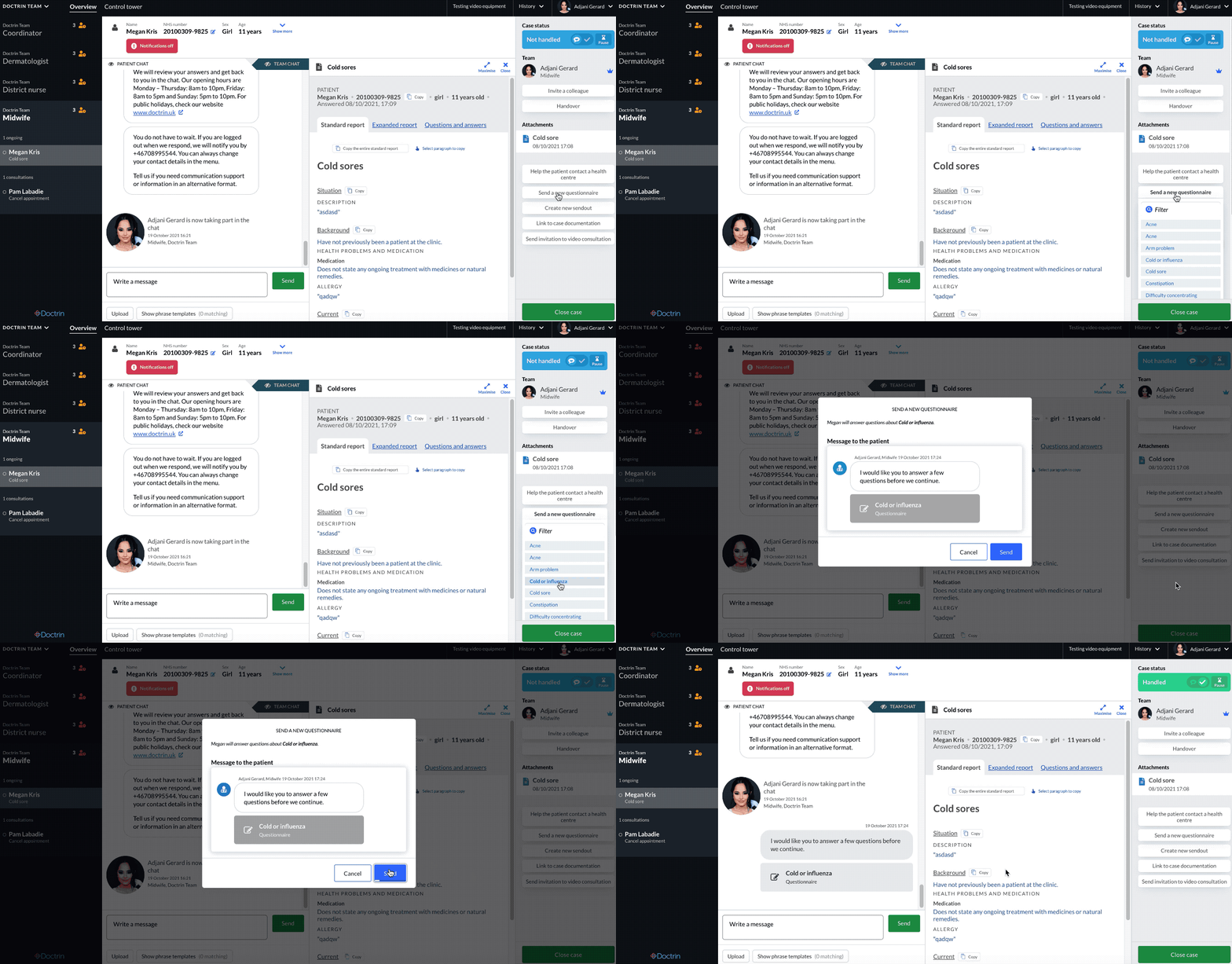
In many cases, the patient has filled in a questionnaire before entering the chat. Based on your assessment, you may want to send additional questionnaires. It could be that the patient has picked the wrong questionnaire, or that you have made a discovery that you want to know more about.
The unit superuser can configure what questionnaires are available. This could be another set of questionnaires than those that the patient can select from when they choose their search cause at the beginning of the case. Note that the list of questionnaires will automatically be filtered by the age and gender of the patient, so that you can only send appropriate questionnaires.
How to send additional questionnaires to a patient:
- Go to the case view for a patient.
- Select “Send new questionnaire” in the tool panel.
- Choose a relevant questionnaire. You may want to filter the list by clicking “Filter” and start typing the name of the questionnaire.
- When selecting a questionnaire in the list a dialog box will appear. Confirm by clicking Send.
The questionnaire is immediately sent to the patient. When the patient has responded to the questionnaire, you will see the report in the chat and as an attachment in the case.
Updated on 2023-08-10