
Get started with Sendouts
Use Sendouts to send information to patients in a secure way. The recipient logs in and authenticate themselves digitally to read the information. Gather more information before a physical visit, send information that you don’t need a response to, inform about a follow-up or new visit.
Our recommendation
To get started with Sendouts, choose a specific type of case, such as communicating normal test results or X-ray results. For most outbound contacts where you would previously send a traditional letter or call the patient, you can use Sendouts instead.
Introduction to Sendouts
There are 2 types of Sendouts. Default Sendouts with chat/case and information sendouts where the recipient receives one-way information. Information Sendouts can also be sent as bulk Sendout to a larger group of recipients. Choose the type that suits your needs with the recipient.
| Default sendout | Information sendout | |
|---|---|---|
| General information | This type allows you to communicate with a patient for the period that the patient needs. | This type replaces a traditional letter or occasions where you previously called the patient. You can send information such as an exercise programme, X-ray results or an appointment details. |
| A case is created | Yes, if the patient send an answer. | No |
| Possibility to chat | Yes | No |
| Attach questionnaire | Yes | No |
| Attach meeting room | No | Yes |
| Patient can answer | Yes | No |
| Use phrase templates | Yes | Yes |
| Send deep links to meeting rooms | Yes | Yes |
| Can be sent as bulk sendouts | No | Yes.Remember not to include any personal information. |
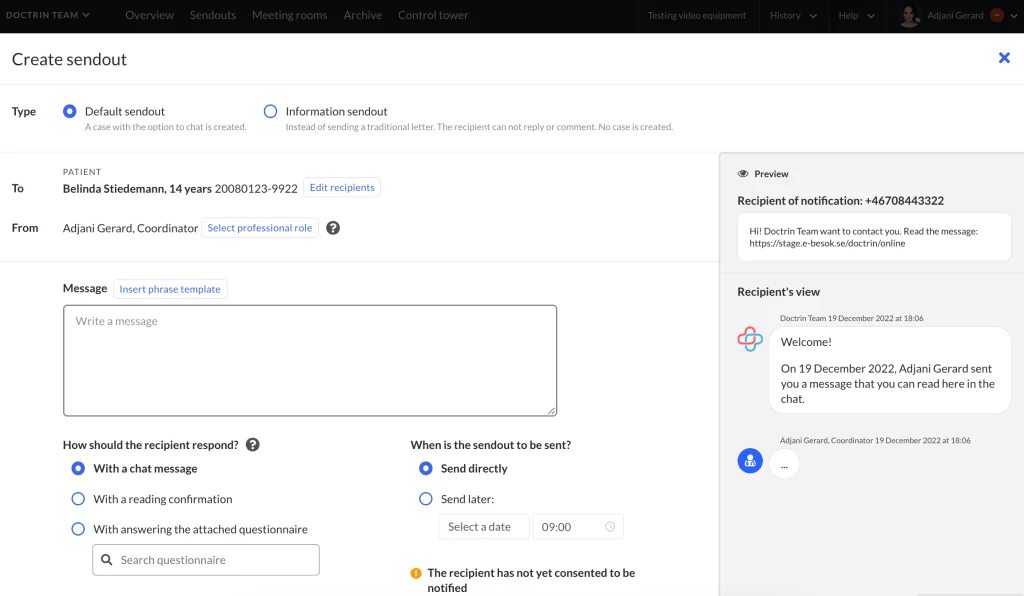
Send directly or schedule for later
You can prepare the content for a sendout, and then choose whether to send it directly or schedule the sendout for a later selected time.
Regardless of the type of sendout, the recipient is notified (by SMS or e-mail). The notification contains a link to log in to the platform and access the information.
It is important that you inform patients about the sendout so that they understand when they need to act on what you send them.
Consent to notify a patient
Make sure that the patients you contact have consented to being notified by SMS or email. Each time you send a sendout, the recipient will receive a notification and a reminder if they have not received and opened what you have sent them.
Additional information
To create an even smoother sendout workflow, use phrase templates (predefined templates).
Updated on 2024-05-31