
Explanation of statuses for sendouts and bulk sendouts
The “status” column helps you understand what has happened with a sendout. Each status has an explanation that you can read by hovering your cursor over the status in the list.
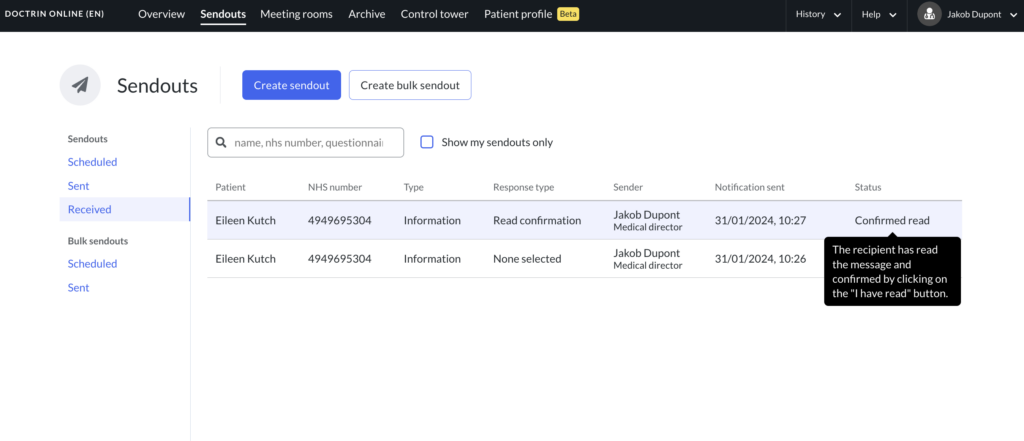
Status for sendout – to 1 recipient
Status: Sent
- Notification has been sent, but the recipient has not yet logged in. This may be because the recipient did not receive the notification, did not click on the link, or the phone number did not match the unique identifier (such as SSN, NHS number, member ID).
- The patient can open and answer the case at any time during the entire data storage period (normally configured to 18 months, per unit).
- If the patient has not responded within the data storage period, the Sendout will be deleted.
Status: Opened
- The recipient has logged in and opened the case. There is no guarantee that the recipient has read the information.
- The patient can answer the case within seven days.
- If the patient has not responded within seven days, the status changes to expired.
- If the data storage period has passed and the patient has not done anything, the Sendout will be deleted.
Status: confirmed read
- The recipient has logged in, read the message and confirmed by clicking on the “I have read” button.
Status: Expired
- The recipient has logged in and opened the case but not responded within a pre-set period of time (normally 7 days). The case is therefore locked for communication. There is no guarantee that the recipient has read the information.
- The patient will see the case as closed, but can still read and take part in the information.
- If the data storage period has passed and the patient has not done anything, the Sendout will be deleted.
Status: policy denied
If the Privacy Notice is activated for a unit, the patient need to give consent to storing their information before they can see a message you have sent.
- The patient has not given consent to the Privacy Notice and has therefore not been able to read the information in the message. The case has therefore been closed.
- If the patient does not give consent, the case will be closed. The status “No consent to Privacy Notice” is shown for the caregiver.
- If the patient closes the case, it is no longer visible to the patient.
- If the patient do not consent to the Privacy Notice and does not close the case, the status is shown as “open” until the case is closed automatically after a pre-set period of time (normally 7 days) and the status is changed to “expired”.
- The patient can always choose to regret or close a case within a pre-set period of time (normally 7 days).
- When the data storage period has passed, pending cases will be removed.
Note! Time periods are normally pre-set at 7 days but can be adapted to a unit’s way of working.
Statuses of bulk sendouts – for information sendouts
The sent and scheduled tabs help you keep track of the status of your bulk sendouts. The internal name you enter separates them in each tab.
Status: sending..
- The platform is in the process of going through the recipients and sending a sendout to each person. If a bulk sendout has many recipients, it may take some time for the platform to work through the list.
Status: sent
- A notification has been sent, but the recipient has not yet logged in. This may be because the recipient did not receive the notification, did not click on the link, or the phone number did not match the unique identifier (such as a nhs number).
- A patient can open a sendout at any time during the entire data retention period (normally configured to 18 months, per unit).
- If a patient has not opened a sendout within the data retention period, the sendout will be deleted.
Status: opened
- The recipient has logged in and opened the sendout. There is no guarantee that the recipient has read the information.
Status: confirmed read
- The recipient has logged in, read the message and confirmed by clicking the “I have read” button.
Updated on 2024-02-02