
Main menu
The main menu contains: the units you have access to, the overview, sendouts, appointments, archive, patient profile, and a control tower. Depending on what is activated for your unit. By default, there is also a history tab and settings for your user.
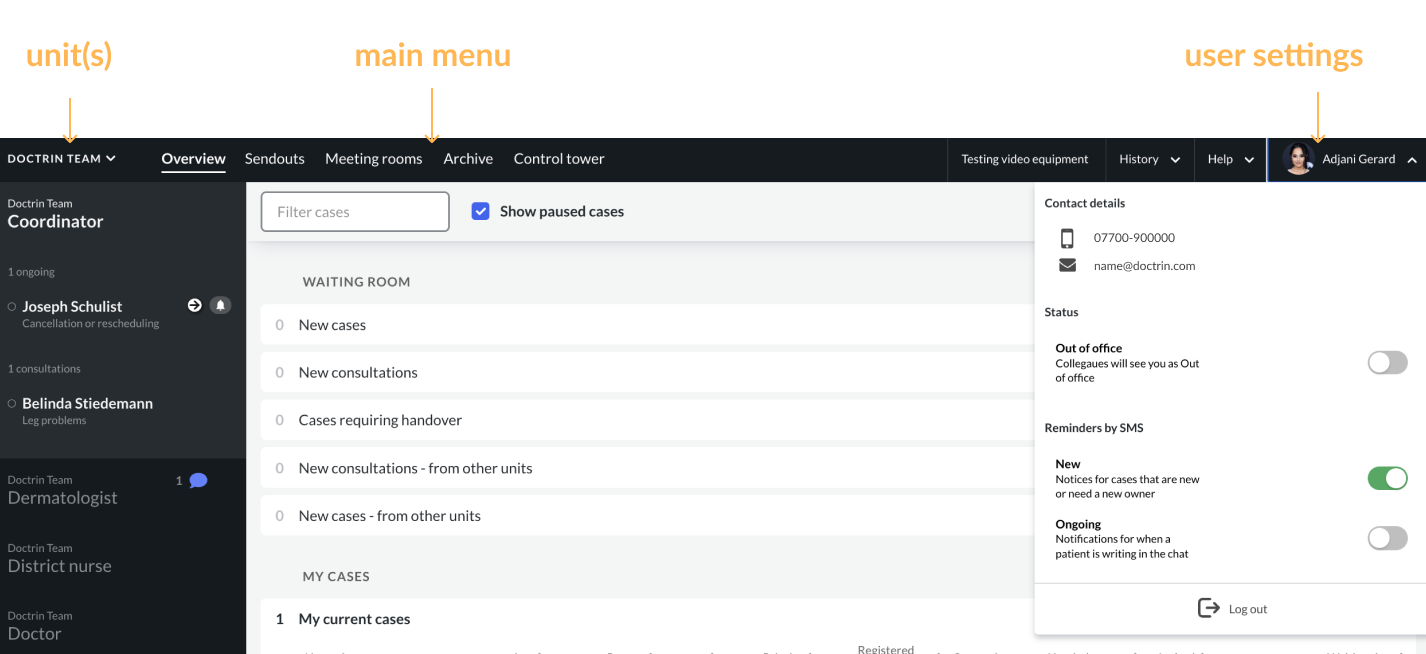
In the main menu you can find; the unit(s) you have access to, the Overview, Control Tower (if this is activated for your user), history tab and the settings for your user account.
The unit(s)
If you have access and work in one unit you see the name of the unit i the main menu.
If you have access to and work in multiple units, you can see an arrow next to the unit name. By hovering over the arrow you can switch between the units. The units you have access to is visible in a dropdown list.
The Overview
The Overview is always the first view after log in.
Sendouts
If Sendouts is activated, you can create and manage Sendouts from this page.
Meetings rooms
If Meeting Rooms is activated, you can create, manage and join Meeting Rooms from this page.
Archive
The archive collects all cases that have been closed in the last 14 days. The archive is there to support you when you need to document events in an external system.
Control Tower
If Control Tower is activated for your user you can follow up the work in the unit(s).
History tab
Find past events about the cases you are participating in, in history tab. You can see if someone else has closed a case or if you have been removed from a case. Each event remains in this tab for 14 days.
Settings for your user account
See your personal information, manage notifications, retrieve debug code for support cases and log out.
Updated on 2025-12-24