
Manage documents and policies
Documents and policies are accessible for the patient in the patient interface in order to give more information about e.g. payments, privacy data and accessibility.
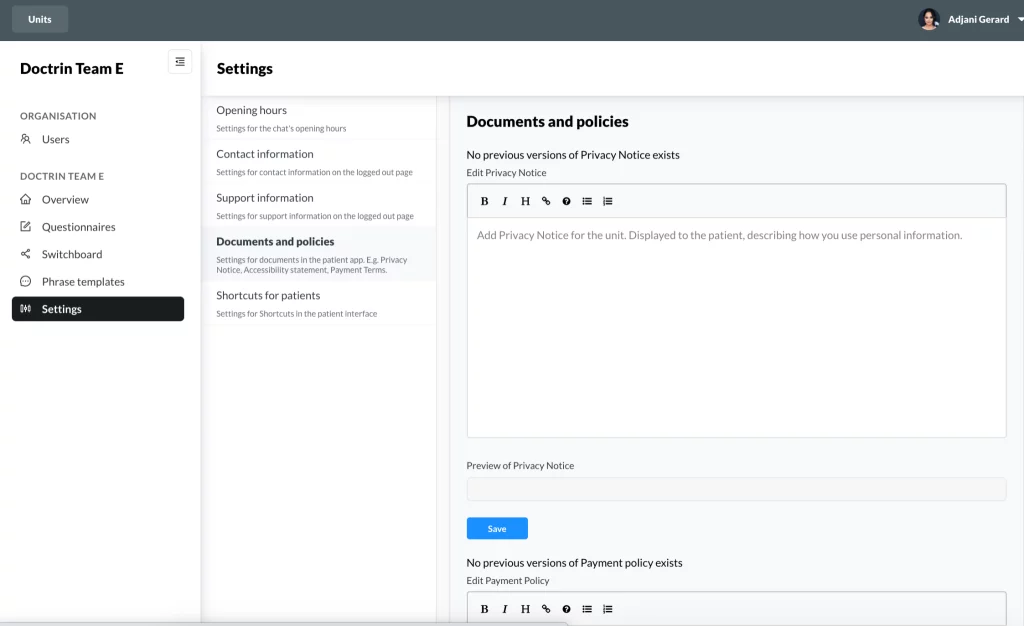
Examples of each document or policy that you can create
Accessibility statement
Privacy Notice
Payment Policy
How to add or update a document
- Login in to Admin and select the unit you want to manage.
- Go to to Settings and Documents and policies
- Scroll to the policy that you want to update.
- In the text field, make changes to your policy.
- In the Preview you can see the result of your changes.
- When you are done – Save the policy that you have edited.
When you save, a new version will automatically be created and activated. This means that you can always go back to a previous version if you want.
Updated on 2023-01-23