
Close a case – using default way
Close a case the default way to give a patient a caring experience. Once you know that the patient has received the help they need, you can close the case. The patient will be asked if they are ready to close their case.
Cases are either actively closed by a healthcare professional, or automatically due to patient inactivity. When you choose to close a case the default way, a chat message is sent to the patient asking if they are ready to close the case.
It is recommended that all participants in a case have completed their documentation before you close a case. If you are removed from a case, or if a case is closed before you have completed your documentation, this can be done via the case documentation. A link to it can be found in the history tab in the menu.
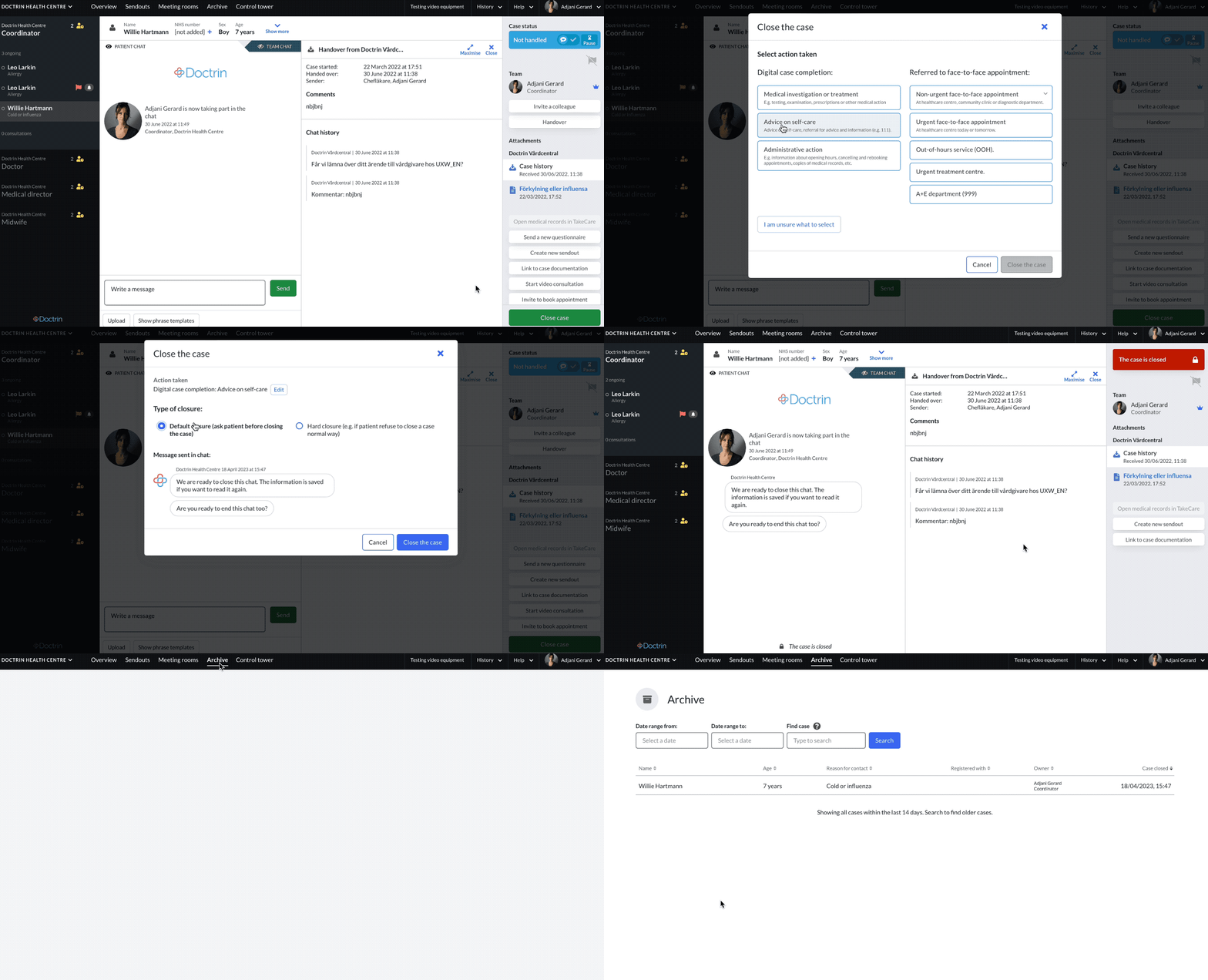
A case can be closed in three ways:
- By closing a case manually, by a professional user.
- By handing over a case to another unit.
- By inactivity from the patient. If a patient does not respond, a case expires automatically within a set time period (normally 7 days). This is a setting for each unit.
How you close a case:
- Go to the case view for a patient.
- Select “Close case”
- A new window will be displayed to confirm that the case should be closed, select default closure.
- When you select close, a chat message will be sent to the patient to confirm that they are ready to close the case. You can see a preview of the chat message that will be sent to the patient before continuing. You will be redirected to the Overview after selecting close.
If a patient answers “Yes”; The case id then closed.
Automatic chat messages are sent to the patient, usually with relevant information on how to retrieve their medical records. If the “feedback questions” module is activated, the patient will also receive one or more questions about their experience.
If a patient answers “no”; The case is opened again, and appears in your list for ongoing cases again.
If the owner of the case does not handle the case within a pre-set period of time (normally 15 minutes), the case appears in the “Cases that need a new owner” list, and the platform asks for someone with the same profession as the owner. The reason for this is to minimise the risk of a case being left unattended. A consultant can cancel the timer against the automatic handover by taking over the case.
If a patient does not take action after you have decided to close a case; Case expires after a pre-set period of time (normally 7 days) and is then automatically closed. After that time, the patient will not be able to reopen the case.
- When a case is closed, it can be found in the Archive in the main menu.
Additional settings when closing a case
If a unit has “Case tagging” activated, you will see an extra popup to tag the case with the appropriate option. Either it was handled digitally or guided to a physical appointment.
If a unit has payment activated, you will see an extra popup to choose the level of payment that will be charged your patient.
If Hard Closure is enabled for a unit, you can close a case without a patient’s consent.
Updated on 2023-04-21