
Medical history report – copy items
The copy function allows you to transfer information to an external system in an efficient way.
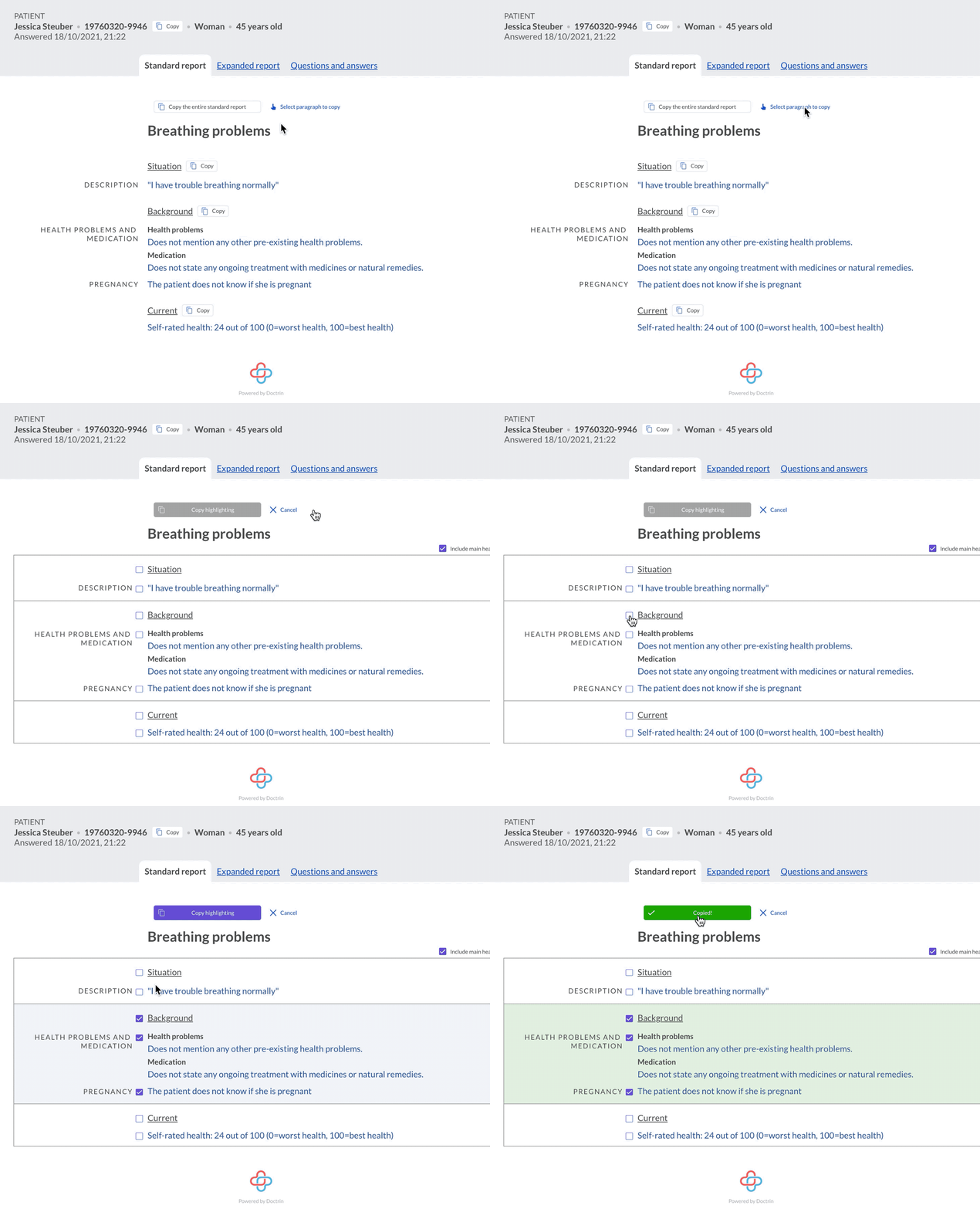
It is possible to copy an entire report, selected paragraphs or selected details for a patient, such as national identifier or background.
Copy everything in a tab
If you choose to copy an entire report, everything in the selected tab (standard report, expanded report, questions and answers) will be copied. The patient’s reason for contact is automatically included when the entire report is copied.
Copy paragraphs
If you want to copy specific paragraphs, activate “Select paragraph to copy”, and make your selection with the checkboxes. Select “copy highlighting” to copy. It is now saved in the clipboard, paste the information where you need to use it.
It is also possible to include the patient’s reason for contact and headings (e.g. “Situation”, “Background”).
Clipboard – copy with formatting
It is possible to include formatting such as font, colour and bold style when copying from the report, e.g. for pasting into an EMR system that allows formatting of text.
A unit manager can activate the function in admin, and set how the clipboard should work.
Updated on 2024-10-21